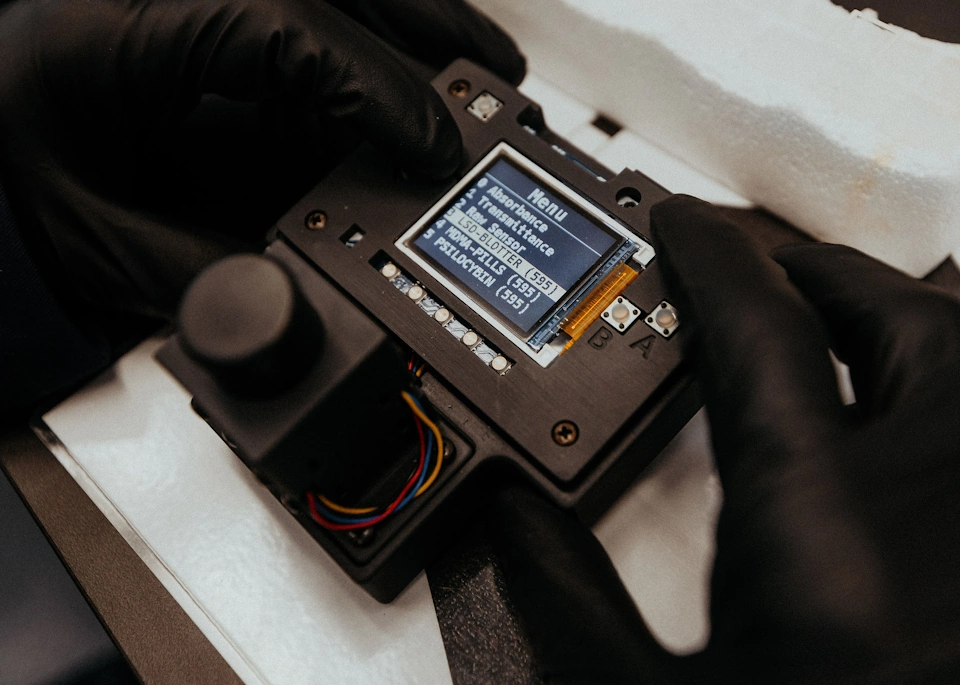
QTest Photometer – Step-by-Step Guide
This guide is not just a technical walkthrough — it's designed to empower you with knowledge. Our goal is to ensure you not only know how to use the QTest Photometer, but also understand the scientific reasoning behind each step.
By learning how photometric analysis works, what each step achieves, and how to interpret your results critically, you gain the tools to make better, safer, and more informed decisions.
We’ve included explanations, practical tips, and answers to common questions, so you can build confidence in your testing — not just follow a protocol. Whether you're testing at home, in a harm reduction setting, or within a research project, this guide supports both precision and understanding.
For a visual overview, we also recommend our video tutorial. tutorial.
What is the QTest Photometer and what does it do?
The miraculix QTest Photometer is a compact and user-friendly device that allows you to measure how much of a specific psychoactive substance is present in your sample. It works with miraculix QTests such as MDMA QTest, LSD QTest, and Psilocybin QTest, and is designed to provide accurate results by reading the color change that occurs when the detection solution reacts with the substance.
While our QTest method involves comparing the color of the detection vial to the color of the color chart manually, the photometer does this automatically and with much higher precision, removing the need for visual interpretation and personal judgment.
The QTest Photometer provides a scientific way to quantify substance content. The more you use it, the better you will understand how to obtain consistent and reliable results. It’s a tool for both learning and precision.

Understanding the system: Photometer + QTests
It’s important to understand that the photometer itself is a measurement device. It doesn’t detect anything on its own — it works together with the detection solutions from our QTests (such as MDMA QTest, LSD QTest, or Psilocybin QTest).
Each QTest has a specific reagent (detection solution) that reacts with a particular substance. The photometer simply measures how much that solution has changed after reaction. This means you can use the same photometer for different tests, as long as you use the correct reagents and follow the correct procedure.


Photometer Controls Overview
This quick overview shows the essential buttons of your QTest Photometer.
- Use Menu Up/Down to navigate.
- Press Enter to confirm your selection.
- Use the Blank button before measuring to set a reference with the unused detection solution.
- Switch the device On/Off using the toggle next to the USB port.
Step 1 – Powering on and preparing the device
When you first plug in the photometer and turn it on, you may see some numbers on the screen. These numbers are completely normal. The device is reading the amount of light passing through empty air inside the chamber — this is called an initial absorbance reading. It’s part of the startup process and doesn’t require any action.
Let the device warm up for 5–10 minutes. This is important because the LED light inside the photometer needs to stabilize before you can make accurate measurements.
*Helpful tip: While the photometer is warming up, you can use this time to perform the QTest. This way, once the photometer is ready, your test solutions will already be prepared — and you can move straight into blanking and measurement.


Step 2 – Perform a Blank (Set the Zero Point)
Before measuring your sample, you must perform a blank. This step calibrates the photometer by telling it: “This is zero.”
A blank defines the baseline color of your detection solution so the photometer can subtract it from your sample measurement. This avoids false positives or overestimated readings caused by the natural color of the reagents.
A correct blank is prepared same way as your testing test just without any sample.
- Follow the same protocol as for your specific QTest
- Pipette ≥800 µL of the blank into a clean cuvette.
- Insert it into the photometer with the triangle facing you and aligned with the screen.
- Close the cuvette holder lid completely to block ambient light.
- Press the Blank button — the device will register this as the baseline for all following measurements.
You must blank the device each time it is turned on. If you are testing multiple samples of the same substance while the device remains on, you can reuse the same blank setting. Some users prefer to re-blank before each sample for extra precision, especially when readings are close together — this is optional and depends on your accuracy needs.
For more details about blank storage and reuse, please refer to the FAQ section.
Step 3 – Measuring your sample
- Prepare your sample according to the instructions provided with the specific QTest you are using and follow up with README instructions.
- Once the test is complete, transfer at least 800 µL of the detection solution into a new clean cuvette. Don't use the same cuvette as the blank for this.
- Insert it into the photometer (triangle facing forward) and close the cuvette holder with the lid.
- The photometer will display a value — this number corresponds to the concentration of active substance present in your sample.
⚠️ Important: Always ensure that the detection solution in the cuvette is fully mixed and has a uniform color before inserting it into the photometer.
You can do this by gently pipetting the liquid up and down a few times to mix the reagent and sample thoroughly. Uneven color can affect how the device reads the light and lead to inaccurate results.


Why Do the Numbers Sometimes Fluctuate When Reading a Sample?
After inserting your sample and starting the measurement, you might notice that the numbers on the screen fluctuate slightly — for example, shifting between values like 14.59 → 14.63 → 14.57 before stabilizing. This behavior is normal and expected.
The photometer measures how much light is being absorbed in real time, and small environmental or handling factors can briefly affect the reading. These may include:
- Slight vibrations from the surface the device is on
- Temperature changes in the cuvette or surroundings
- Ambient light entering the chamber (if the lid is not fully closed)
- Misaligned or dirty cuvettes
- Touching the cuvette holder while the device is reading
Tips for Stable and Reliable Readings
To improve consistency and reduce fluctuations:
- Wait a few seconds after inserting the cuvette and closing the lid before taking the reading
- Avoid touching or moving the device or table during measurement
- Do not touch the cuvette holder once the cuvette is inserted
- Make sure the cuvette is clean and the triangle is properly aligned
- Let the reading stabilize before writing down or interpreting the result
- If the number keeps jumping, remove the cuvette, check alignment and cleanliness, and reinsert it

Note for Psilocybin Bulk Kit Users
If you are using the Psilocybin Bulk Kit, please keep that the kit includes its own set of reagents and it is essential that you follow those instructions closely.
⚠️ Do not return used blank solution to the original bottle
Never pour used or partially used blank solution back into the original reagent bottle. Once the blank has been exposed to air, glassware, or pipettes, it may carry contaminants or trace amounts of active compounds. Returning it to the main bottle can spoil the entire reagent and compromise future measurements.
Always store reused blank solutions separately in a clean, labeled glass container to maintain the integrity of your reagents and ensure consistent, reliable results. For more details, please refer to the FAQ.
Step 4 – Learning through practice and joining our community
These methods are designed to be robust and reliable. Small variations in pipetting or timing will not drastically affect your results. However, your accuracy will naturally improve the more tests you perform.
Just like in any scientific experiment, precision comes with practice, attention, and curiosity. Over time, you’ll develop an intuitive understanding of how to prepare your samples, recognize stable readings, and interpret results with confidence. Think of it as a skill — one that gets stronger with experience and care.
And remember: you’re not alone in this. We’re here to support you along the way. If you have questions, want help interpreting a result, or simply wish to share your experience, you can always reach out to us by email. You’re also invited to join our Signal Photometer Community Chat, where other users exchange tips, troubleshoot together, and grow their knowledge collectively.

Frequently Asked Questions about the QTest Photmeter
You can, but with caution. The reagents in the detection solution may stain or damage the cuvettes over time since, especially if they’re not cleaned immediately and the detection solution may contain acids that can damage them. If you decide to reuse them, we recommend the class cuvettes, rinse them with destilated water and dry them thoroughly as soon as you're done with the reading. Make sure they’re completely clear and show no traces of color, as leftover stains can interfere with your results. For beginners, we recommend using fresh cuvettes for each sample until you feel confident in your technique.
The blank prepared during the testing procedure may be reused if handled and stored appropriately.
⚠️ Under no circumstances should the used blank solution be returned to the original stock vial. After performing the blank measurement, pour any leftover solution into a clean glass container (not plastic), seal it tightly, and keep it in the fridge, protected from light. Under these conditions, the blank can be reused for up to one month.
However, over time, the color of the blank may shift slightly — especially if stored for several days. This change can lead to small variations in your results, usually around 1–3%, which may appear as a mild false positive.
If the stored blank becomes darker than it was originally, the photometer will treat this darker color as the new “zero.” When you later measure your real sample — which is dissolved in a fresher and slightly lighter detection solution — the photometer might interpret that difference as if your sample contains less active compound than it actually does.
This variation is not representative of your true sample — it's simply a result of using a blank that no longer matches the background of the test solution. Whether this affects you depends on how precise you want to be. If you need high accuracy (e.g., for dose comparisons or consistency), we recommend preparing a fresh blank each time. For general use or learning, reusing the stored blank is fine — just monitor the storage time and check that the color hasn’t changed noticeably.
No — never return any used solution to the original bottle from the Bulk Kit. Once the blank has been in contact with air or equipment, it may carry contaminants or traces of active compounds, which can spoil the rest of the reagent and compromise future tests. Always store reused blank solutions separately in a clean, labeled glass container. Keeping your reagents uncontaminated is key for getting reliable and consistent results.
Yes! You can perform a blank measurement as many times as you like. Just insert the blank cuvette again and press the “zero” or “blank” button on the device.
Each cuvette has a small triangle marking — this triangle must point toward you and be aligned parallel to the photometer screen when inserted. This is important because the cuvettes are not perfectly symmetrical — the light path must go through the correct flat sides for accurate results. Misalignment can lead to errors in absorbance readings.
Yes, you can. Just make sure to use a clean cuvette for each sample and follow the same steps: blanking if needed, inserting the sample, and recording the result. This way, you can run multiple tests in a row without restarting the device.
Yes! The photometer works with MDMA, LSD and Psilocybin QTes. However, each test requires its own specific detection solution and blank, so: test one substance at a time, perform the blank for each substance, and do not mix detection solutions or blanks across different QTests. We recommend finishing all measurements for one substance before starting with the next.
Because using the QTest Photometer is not just about following steps — it’s a hands-on learning process. These methods are built to be robust and reliable, so small variations (like slight differences in pipetting or timing) won’t ruin your results. But over time, you’ll start to notice patterns and build confidence in your technique.
Just like in any scientific experiment, precision comes from a combination of practice, attention, and curiosity. The more tests you perform, the more naturally you’ll recognize clean sample preparation, stable readings, and how to interpret your data accurately. It becomes a skill — and like any skill, it improves with experience and care.
And remember, you’re not doing this alone. We’re here to help. If you ever have doubts, want a second opinion, or simply want to share your progress, feel free to email us. You’re also warmly invited to join our Signal Photometer Community Chat, where users share insights, solve issues together, and grow as a community.
Yes – the QTest Photometer is fully compatible with our QTest reagents, making it easy to upgrade without switching products.
Yes – gently mix the contents by swirling or flicking the cuvette to ensure even distribution of the reagent and sample before measuring.
No calibration is needed before each test. Just make sure to use a fresh or valid blank before starting a new session.
Check for residue in the cuvette, bubbles, the color of the detection reaction isn´t homogeneous or improper blanking. Clean the cuvette, re-blank if needed, and try again.
About the author
Dr. Marina Garcia Moreno – Scientific Author
Dr. Marina Garcia Moreno is the Chief Scientific Officer at miraculix Lab, where she leads scientific development focused on harm reduction, drug checking, and psychoactive substance analysis. She holds a PhD (Dr. rer. nat.) in Medical Microbiology and Bacteriology from Friedrich Schiller University Jena (Germany), and has over 8 years of experience in biomedical and translational research.
Before joining miraculix, Dr. Garcia Moreno worked as a postdoctoral researcher at the University Clinic Jena. Her academic training includes a Master’s degree in Biomedicine and Molecular Biology from the University of the Basque Country.
As a multilingual science communicator, she is deeply committed to science-based education, public health, and bridging the gap between research and society. Through her writing and development of analytical tools, she aims to make scientific knowledge accessible, reliable, and actionable for a broad audience, from professionals to the general public.
You can learn more about her background on LinkedIn.

You still have open questions about our QTest Photometer or measurement procedure?
We could not answer your questions completely on this page? Then write us your questions about the QTest Photometer measurement procedure quickly and easily in the form.